Bluetooth®/MD connection
You can input the sound of your mobile device, etc. to the unit via Bluetooth or output sound from the unit to a mobile speaker, etc.
Pairing with a mobile device (Bluetooth input)
1Press the [MIXER SETTINGS] button.
The [MIXER SETTINGS] screen appears.
2Touch [CH 1] or [CH 2] in [Bluetooth Input] on the [MIXER SETTINGS] screen to assign the sound to.
•The Bluetooth sound can be assigned to either of the channels. The Bluetooth sound is output from the selected channel.
3Touch  for [Bluetooth Input].
The [Bluetooth Input Setting] screen appears.
1.PAIRING
2.Name of the connected device
3. (Remove device)
4.  (Bluetooth connection icon)
4Touch [PAIRING].
The unit enters pairing state.
•The Bluetooth icon blinks while the unit is in pairing state.
5Perform the pairing procedure on a Bluetooth device.
6Allow the connection on the unit.
The Bluetooth indicator on the unit stops blinking and lights up when the connection is established.
•Mind the output volume.
•Perform the pairing procedure on a Bluetooth device while the unit is in pairing state. If the unit can’t pair with a Bluetooth device, the Bluetooth indicator turns gray.
•For details on the pairing procedure for the Bluetooth device, refer to the device’s instruction manual.
•You can only connect the unit to one Bluetooth device at a time. If the unit pairs with a second device, the registration of the first device will be lost. To register the first device again, perform pairing with the device.
•Touch to connect with other Bluetooth device than the registered one.
Connecting to a mobile speaker, etc. (Bluetooth output)
1Press the [MIXER SETTINGS] button.
The [MIXER SETTINGS] screen appears.
2Touch [ON] in [Bluetooth Output] on the [MIXER SETTINGS] screen.
3Touch for [Bluetooth Output].
The [Bluetooth Output Setting] screen appears.
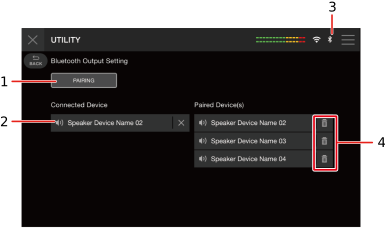
1.PAIRING
2.Name of the connected device
3. (Bluetooth connection icon)
4. (Remove device)
4Touch [PAIRING].
The unit enters pairing state.
•The Bluetooth icon blinks while the unit is in pairing state.
5Perform the pairing procedure on a Bluetooth device.
The Bluetooth indicator on the unit stops blinking and lights up when the connection is established.
•Mind the output volume.
•You may need to enter a passcode, etc., depending on the connected device. Follow the instructions on the screen to connect.
•Perform the pairing procedure on a Bluetooth device while the unit is in pairing state. If the unit can’t pair with a Bluetooth device, the Bluetooth indicator turns gray.
•For details on the pairing procedure for the Bluetooth device, refer to the device’s instruction manual.
•If you use a Bluetooth device registered to the unit, the unit automatically connects the device when Bluetooth turns on.
•You can register 5 Bluetooth devices to the unit. If the unit pairs with a new device when 5 devices are already registered, the first registered device will be cleared. To register the device again, perform pairing with the device.
•Touch to clear the registered device.