Turn the unit off and disconnect the power cord before connecting other units.
Connect the power cord after all the connections are complete.
•Use the supplied power cord.
•Read the instruction manuals for the devices you are going to connect with the unit.
You can transfer audio files and management data of rekordbox for use on this unit using a USB device (flash memory or hard disk). You can play playlists or tracks with cues, loops, and Hot Cues previously set in rekordbox.
•This unit only supports OneLibrary.
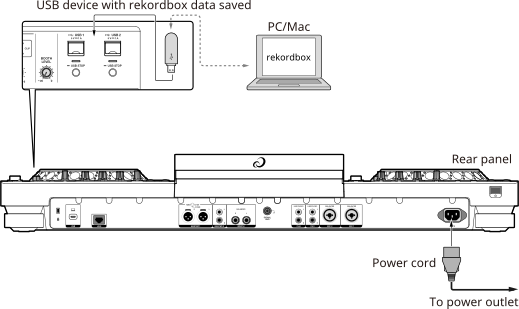
You can directly select and play tracks in rekordbox with this unit when the unit is connected via a LAN cable (CAT5e), a USB cable, or wireless LAN (Wi-Fi) to a PC/Mac or mobile device running rekordbox. You can play playlists or tracks with cues, loops, and Hot Cues previously set in rekordbox.
•Install the rekordbox for Windows USB connection (Link Export) driver software before connecting the unit to a PC with a USB cable.
•For information on the connection with rekordbox for iOS/Android, refer to the FAQ at the URL below.
iOS:
rekordbox.com/en/support/faq/connecting-to-dj-units/#faq-q100037
Android:
rekordbox.com/en/support/faq/connecting-to-dj-units-android/#faq-q110039
When using a USB cable
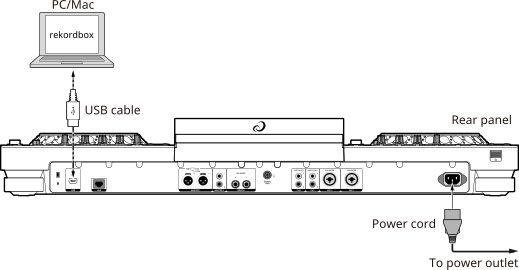
•Insert or pull a USB cable straight into/out of the USB port on the rear panel. Be careful not to apply force in a vertical or horizontal direction.
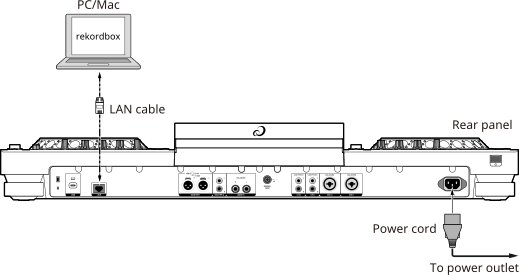
When using a wireless LAN router and an access point
Using a LAN cable:
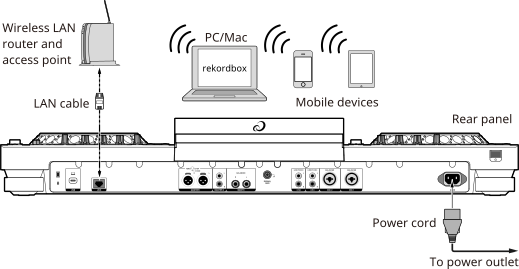
Using the internal wireless connection (Wi-Fi):
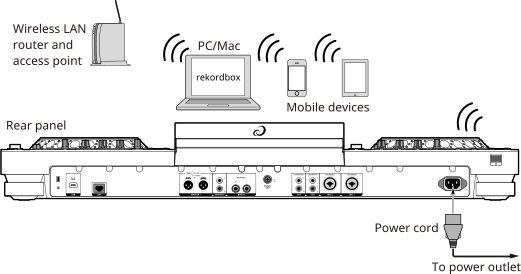
•While using the internal wireless connection (Wi-Fi) on the unit, you can’t use rekordbox Link Export via a LAN cable (CAT5e) or a USB cable.