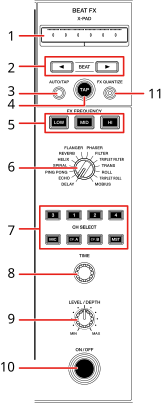
1.X-PAD
Touch to turn an effect on and off. You can adjust the time and quantitative parameters when you touch or slide your finger on X-PAD.
2.BEAT  ,
,  buttons
Sets the number of beats for Beat FX.
3.AUTO/TAP button
Sets BPM measuring method (AUTO/TAP).
—[AUTO]: Automatically measures BPM of the input sound. It’s automatically set to AUTO mode when the unit is turned on.
—[TAP]: Manually sets a BPM by tapping the [TAP] button.
4.TAP button
Manually sets a BPM by tapping the [TAP] button when BPM measuring mode is set to [TAP].
5.FX FREQUENCY (LOW, MID, HI) buttons
Selects the range (LOW/MID/HI) to apply Beat FX to. The selected button lights up.
6.BEAT FX selector switch
Selects a Beat FX.
7.CH SELECT button
Selects a channel to apply a Beat FX to.
8.TIME knob
Adjusts the time parameter for Beat FX.
9.LEVEL/DEPTH knob
•Turn the knob all the way counterclockwise to output the original sound.
10.ON/OFF button
Turns Beat FX on and off. The button blinks when the effect is turned on.
11.FX QUANTIZE button
Turns on and off Quantize for Beat FX. If you use Quantize, the unit adds an effect by automatically synchronizing it with the beat according to the track’s grid information analyzed by rekordbox or this unit.
1Turn the BEAT FX selector switch to select a Beat FX.
2Press a [CH SELECT] button to apply Beat FX to.
•To apply Beat FX to the microphone sound, you can select a microphone to apply Beat FX to in [BEAT FX MIC] in the Utility settings or on the [MIXER SETTINGS] screen.
–[MIC1]: Applies Beat FX to MIC 1.
–[MIC2]: Applies Beat FX to MIC 2.
–[MIC1+MIC2]: Applies Beat FX to MIC 1 and MIC 2.
3Press the [BEAT ] or [BEAT ] button to set a beat fraction to synchronize the effect with.
4Press the [FX FREQUENCY (LOW, MID, HI)] button to select the range to apply Beat FX to.
5Turn the [TIME] knob and [LEVEL/DEPTH] knob to adjust the effect.
6Press the [ON/OFF] button or touch X-PAD to turn the Beat FX on.
The Beat FX is applied to the selected channel.
•Press the [ON/OFF] button again or release X-PAD to turn the Beat FX off.
•If you use Quantize for Beat FX, the unit adds an effect by automatically synchronizing it with the beat according to the track’s grid information analyzed by rekordbox or this unit.
Setting BPM manually (Tap mode)
1Tap the [TAP] button more than twice in time with the beat of the track.
BPM is set according to the average time between taps.
•The beat fraction is set to 1/1 when you set BPM with the [TAP] button, and the length of one beat is set as the effect time.
•Turn the [TIME] knob while pressing the [TAP] button to adjust BPM in increments of 1.
•Press the [BEAT ] or [BEAT ] button while pressing the [TAP] button to adjust BPM in increments of 0.1.
You can adjust the following settings with the buttons and knobs.
*1When the Beat FX channel selector is set to a channel from CH 1 to CH 4, you can’t monitor the effected sound even if you press the [CUE] button for the relevant channel.
*2Only the effect sound remains if you set the channel fader to the [0] position to cut the input sound (the effect sound remains even after the effect is turned off).