You can load and play tracks from Beatport Streaming via the browse screen of the unit.
Logging in to Beatport Streaming
1Log in to rekordbox CloudDirectPlay.
⇨Logging in to rekordbox CloudDirectPlay
2Open the [SOURCE] screen.
3In the library display, touch [Beatport] and then [LOG IN].
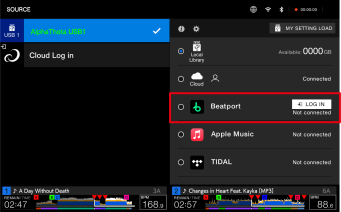
4Log in to Beatport Streaming with your account details.
•Enter a username and password.
After you’ve logged in, [DJ NAME] is displayed on the library display for the USB device.
Playing audio files via Beatport Streaming
When Beatport Streaming is selected on the [SOURCE] screen, audio files from Beatport Streaming can be played from the browse screen of the unit.
•The time it takes to load audio files depends on the speed of your internet connection. You can view the loading progress in the overall waveform on the waveform screen.
•The following playback functions are only available for loaded audio files.
–Memory Cue/Loop
–Hot Cue/Loop point
•Audio files are loaded one by one from the track list. The following functions aren’t available.
–Track Search
–[Continue] in Play mode