Turn the unit off and disconnect the power cord before connecting other units.
Connect the power cord after all the connections are complete.
•Use the supplied power cord and AC adapter.
•Read the instruction manuals for the devices you are going to connect with the unit.
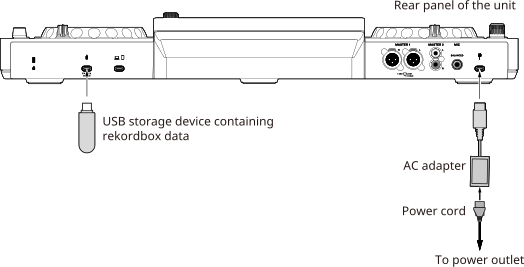
If you export audio files and management data to a USB storage device from rekordbox for Mac/Windows in Export mode, you can use them on the unit.
You can play playlists or tracks with cues, loops, and Hot Cues previously set in rekordbox.
•The unit only supports the OneLibrary format.
rekordbox for Mac/Windows
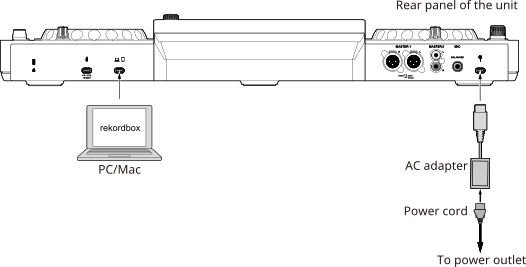
If you put rekordbox for Mac/Windows into Performance mode then connect the PC/Mac to this unit with a USB Type-C cable, you can play audio files from rekordbox and control the software from the unit.
You can play playlists or tracks with cues, loops, and Hot Cues previously set in rekordbox.
rekordbox for iOS
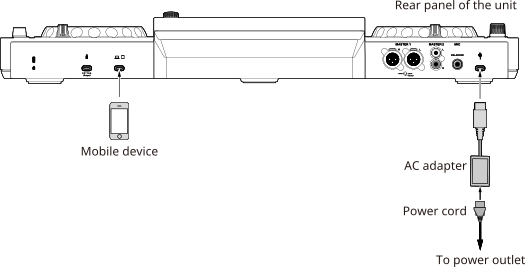
If you launch rekordbox for iOS on a mobile device then connect it to this unit with a USB Type-C cable, you can play audio files from rekordbox and control the software from the unit. You can play playlists or tracks with cues, loops, and Hot Cues previously set in rekordbox.
•Some functions, such as waveform and browsing functionality, are limited compared to rekordbox for Mac/Windows.
•You can connect an iPhone/iPad that has a USB Type-C port.
•DJing via USB cable connection is only supported for iOS.
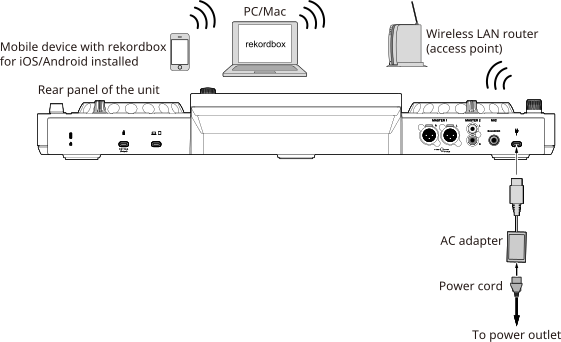
If you connect a PC/Mac running rekordbox for Mac/Windows in Export mode, or a mobile device running rekordbox for iOS/Android using the [Connect to CDJ/XDJ/DJM] function, to the same wireless LAN (Wi-Fi) router as the unit, you can play audio files in rekordbox from the unit.
You can play playlists or tracks with cues, loops, and Hot Cues previously set in rekordbox.
•You can’t select audio files in streaming services from this unit.
•You can’t use rekordbox Link Export via a USB connection with this unit.
■Connecting with rekordbox for Mac/Windows
1Connect a PC/Mac running rekordbox for Mac/Windows to the same Wi-Fi network as this unit.
2Put rekordbox for Mac/Windows into Export mode.
[LINK] is displayed at the bottom of the screen.
3Click [LINK].
The PC/Mac is connected to the unit.
■Connecting with rekordbox for iOS/Android
1Connect a mobile device running rekordbox for iOS/Android to the same Wi-Fi network as this unit.
2Launch rekordbox for iOS/Android in portrait mode.
3Tap [Connect to CDJ/XDJ/DJM] on the browse screen.
4After it’s connected to PRO DJ LINK, press the [SOURCE] button on the unit.
The [SOURCE] screen appears.
5Select the mobile device to connect to.
The mobile device is connected to the unit.
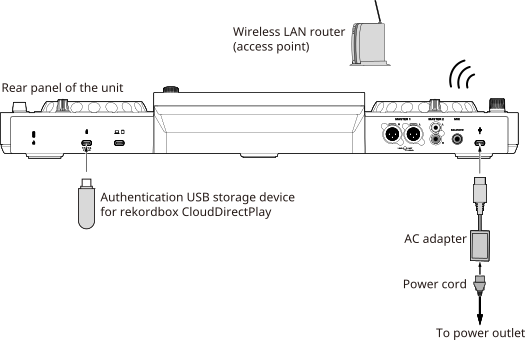
rekordbox CloudDirectPlay
To use rekordbox CloudDirectPlay, connect your wireless LAN router to the internet.
⇨Wireless LAN (Wi-Fi®) connection
•You don’t need an authentication device when you log in to your cloud storage with a QR code.
DJM-REC
If you connect a mobile device to this unit’s USB Type-C terminal with a USB cable, you can livestream, record your DJ mixes, and share your sets with global audiences.
•You can connect an iPhone/iPad that has a USB Type-C port.
•To record via DJM-REC while using rekordbox for iOS, start recording first, then launch rekordbox for iOS.
•DJM-REC enables you to display currently playing track’s information and perform high-quality livestreaming. Note that livestreaming will end If you use another application during your stream.