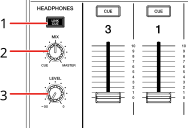
1.LINK CUE
⇨Monitoring sound before loading a track (Touch Preview)
2.MIX knob
Adjusts the volume balance between the master sound and the sound of the channel selected with the [CUE] button.
•Set the knob to [CUE] to monitor only the sound of the selected channel, or set it to [MASTER] to monitor only the master sound.
3.LEVEL knob
Adjusts the volume for sound output from the [PHONES] terminals.
•You can adjust the Link Cue volume in [LINK Preview Volume] in the Utility settings or on the [MIXER SETTINGS] screen.
1Connect headphones to one of the PHONES terminals.
2Press the [CUE] button on a channel to monitor the channel’s sound.
•You can set the sound output (Stereo or Mono Split) in [Headphones Stereo / Mono Split] in the Utility settings or on the [MIXER SETTINGS] screen.
⇨Headphones Stereo / Mono Split
⇨Headphones Stereo / Mono Split
3Turn the [MIX] knob to adjust the volume balance between the channel sound and the master sound.
4Turn the [LEVEL] knob to adjust the volume.
Monitoring sound with SonicLink headphones
1Press and hold the [MENU] button.
The [UTILITY] screen appears.
2Select [SonicLink] in the Mixer category.
The [SonicLink] screen appears.
3Turn SonicLink on.
The SonicLink headphones indicator blinks slowly.
4Press and hold the [PAIRING] button.
The unit enters pairing state.
•The SonicLink headphones indicator blinks fast during paring state.
•If you use headphones that have been registered to the unit before, the unit automatically connects to them when you turn them on – there’s no need to use the [PAIRING] button.
5Turn the SonicLink headphones on, then perform the pairing procedure.
•For details on the pairing procedure for the SonicLink headphones, refer to the instruction manual for the SonicLink headphones.
6Press the [CUE] button of the channel you want to monitor.
•You can set the sound output (Stereo or Mono Split) in [Headphones Stereo / Mono Split] in the Utility settings or on the [MIXER SETTINGS] screen.
⇨Headphones Stereo / Mono Split
⇨Headphones Stereo / Mono Split
7Turn the [MIX] knob to adjust the volume balance between the channel sound and the master sound.
8Turn the [LEVEL] knob to adjust the volume.